
Once your LTL shipment is picked up, the clock starts. Most shippers want to know one thing: where is my freight and when will it arrive? The answer lives in your PRO number and the carrier’s tracking portal, but navigating that system is not always obvious, especially when statuses are vague or something goes wrong.
This guide covers how LTL freight tracking works, what each status means, and exactly what to do when your shipment throws an exception or goes quiet.
Track LTL freight using the PRO number assigned at pickup. Enter it on the carrier’s website or your broker’s portal for real-time scan data. Key statuses to watch: In Transit (normal), Exception (needs attention), and On Hand (freight is sitting, action may be required). If tracking goes dark for more than 24 hours, contact your carrier or broker. For a complete overview of how LTL shipping works, see our LTL shipping guide.
What Is a PRO Number?
The PRO number (also called a Progressive Number) is the carrier’s internal shipment identifier. It is assigned when the carrier generates a pickup confirmation and is printed on the bill of lading. Every LTL carrier uses a unique PRO format. FedEx Freight PRO numbers, for example, look different from Old Dominion’s. The PRO number is what you enter on the carrier’s tracking page, and it is the reference number your broker uses to pull status on your behalf.
If you booked through a broker, you may also receive a load number or order number from them. That is their internal reference. The carrier-assigned PRO is what drives real-time tracking in the carrier’s system, so make sure you have it.
LTL Tracking Status Guide
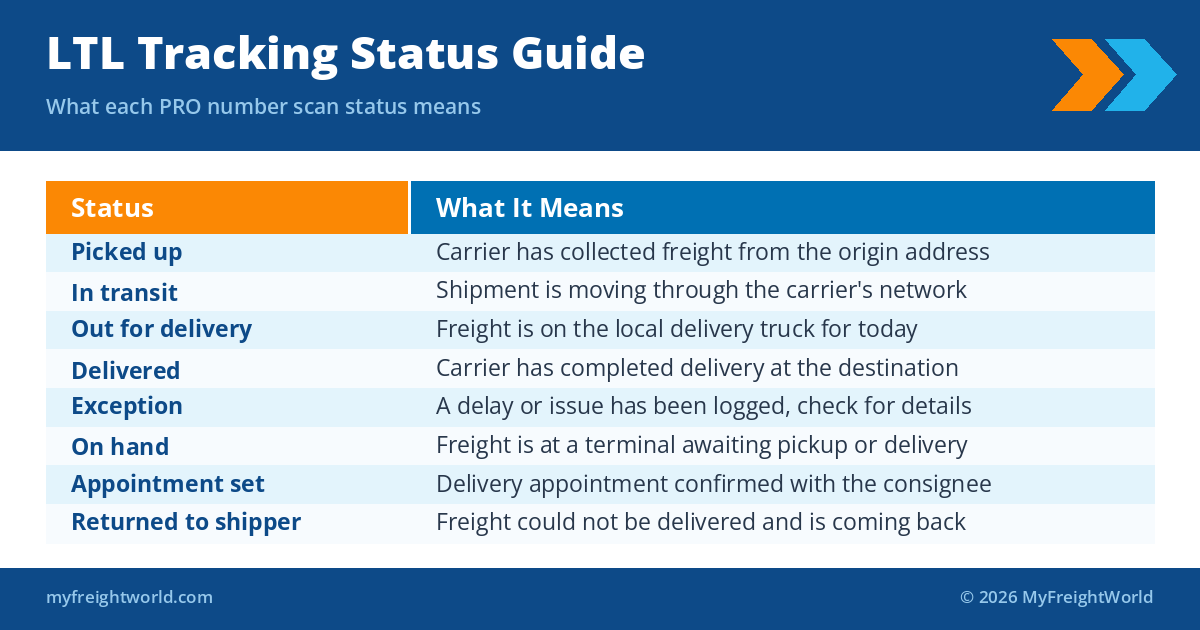
Carrier tracking portals show scan events as freight moves through their network. Here is what each major status means:
How to Track LTL Freight Step by Step
Step one: locate your PRO number. It is on your bill of lading, in your broker’s confirmation email, or in your TMS if you use one. Step two: go to the carrier’s tracking portal. Most carriers have a track shipment page accessible from their homepage, and you just enter the PRO. Step three: read the latest scan event and estimated delivery date.
If you are managing multiple shipments or using multiple carriers, a freight broker can consolidate visibility into a single interface. Rather than logging into five different carrier portals, you see all shipments in one place with a consistent status format.
What to Do When Your Shipment Shows an Exception
An exception means the carrier encountered something that interrupted normal movement. Common causes: the consignee was unavailable for delivery, the address was incorrect, the freight required an appointment that was not scheduled, or the shipment missed a connecting load at a relay terminal. The exception scan should include a reason code, but carrier reason codes are not always plain-language.
When you see an exception, the fastest path to resolution is calling the carrier’s customer service line with your PRO number in hand, or contacting your broker. Brokers often have a direct line to carrier dispatch that bypasses the general customer service queue. Ask for the specific reason code, what needs to happen to clear the exception, and a revised estimated delivery date.
Exceptions spike in Q4. Terminal congestion and compressed receiving windows make peak season the worst time to be chasing a reason code. Our fall peak season freight guide covers this year’s pressure points and how to plan around them.
If your shipment shows On Hand for more than 48 hours with no movement, that is a signal to call. Freight sitting at a terminal can mean a missed relay, a delivery appointment that needs to be scheduled, or a freight that is being held for payment or documentation. Do not wait for the carrier to reach out.
Carrier-Specific Tracking Portals
Each major LTL carrier has its own tracking portal. FedEx Freight tracks at fedex.com, Old Dominion at odfl.com, XPO at xpo.com, and Estes Express at estes-express.com. All accept PRO number input, though the portal layout and update frequency varies. Some carriers update scan events every 30 to 60 minutes; others batch update a few times per day.
For shippers who want a single view across carriers, a freight broker portal or TMS integration provides real-time PRO tracking against carrier APIs without logging into multiple sites. This is one of the practical advantages of working with a broker for regular LTL volume.
LTL SHIPMENT TRACKING
MyFreightWorld provides real-time shipment visibility across all your LTL carriers. Never wonder where your freight is again.
Get a Free QuoteFrequently Asked Questions
What is a PRO number in LTL shipping?
A PRO number is the carrier’s progressive tracking number assigned to your LTL shipment at pickup. It is printed on the bill of lading and is the primary identifier you use to track freight on the carrier’s portal.
How long does LTL freight take to deliver?
LTL transit times typically range from 1 to 5 business days for regional moves and 3 to 7 business days for cross-country shipments. See our full guide on LTL transit times for lane-specific expectations.
What does an exception mean on LTL tracking?
An exception means something interrupted normal freight movement. Common causes include delivery attempt failures, missing or incorrect address information, appointment scheduling gaps, or a missed relay at a carrier terminal. Contact your carrier or broker to resolve it quickly.
Can I track LTL freight without a PRO number?
Some carriers allow tracking by BOL number, PO number, or reference number, but PRO number tracking is the most reliable. If you booked through a broker, they can look up the PRO number using their load reference.
Why is my LTL shipment showing On Hand?
On Hand means the freight is sitting at a carrier terminal and has not moved. This can indicate a missed relay, a delivery appointment that needs to be scheduled, or a documentation issue. Contact the carrier or your broker to find out what is needed to clear the status.
Tracking Is the Start, Service Is What Matters
Real-time tracking is table stakes for LTL freight. What separates a good shipping experience from a frustrating one is what happens when tracking shows a problem. Having a broker in your corner means someone picks up the phone, knows the carrier’s dispatch contacts, and resolves exceptions before they turn into multi-day delays.
If you are managing LTL freight directly and spending time on tracking issues, it may be worth exploring a brokered model. Learn more about what an LTL freight broker does and whether it fits your operation.
TAKE THE GUESSWORK OUT OF LTL
MyFreightWorld manages carrier relationships, tracks your freight, and resolves exceptions on your behalf.
Get a Free Quote